ProCalc · Measurement
ProCalc Collect
Schedule any field activity. Assign it. See it done.
What Collect does
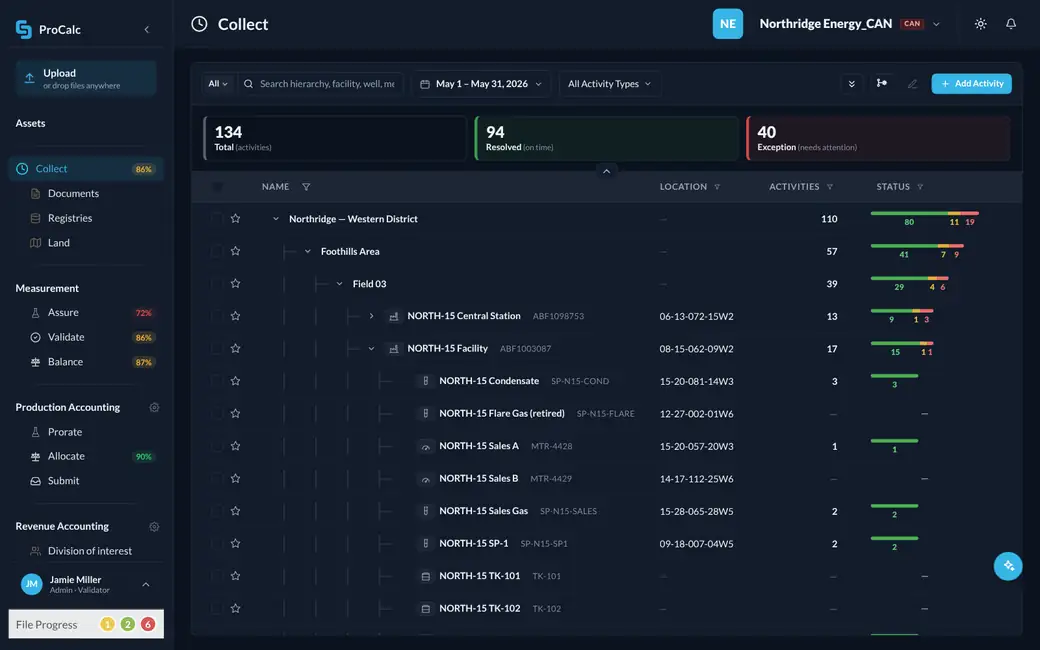
Collect is the administrator’s view of field work. Every activity that has to happen at a site — an inspection, a meter test and calibration, a sample pull, a chart change, cleaning the outhouse — is scheduled, assigned to a person, and paired with the form that person fills in when they get there. The person can be your operator, our technician or a third party’s. They all see the same calendar, and the administrator sees one thing about every activity: done, or not done. Collect and ProCalc FDC are the two hands of the same worker: Collect decides what happens and when; FDC is the phone it happens on.
Detailed walkthroughs
Leave your details and confirm your email to watch.
- Sample sales meter — NORTH-15Field 03 · You4:00 PMIn 3 hrs
- Production log — SOUTH-04Field 11 · YouYesterdayOverdue
- Tank gauge — WEST-22Field 14 · You11:00 AMDone
- Strapping — NORTH-15 OilField 03 · YouTomorrowIn 1d
- Witness — SOUTH-04 salesField 11 · You2:00 PMIn 1 hr
Details
- Asset
- NORTH-15
- Field
- Field 03
- Type
- Sales sample
- Due
- 4:00 PM
Reading
Notes
Witness sample taken, sealed, container 3-A.In the field: ProCalc FDC
Collect decides what happens. FDC is where it gets done.
ProCalc FDC is Collect’s field companion. The technician opens today’s list, taps the activity, and the form that activity needs opens. Readings, samples and calibrations are entered once at the meter, online or offline, and the activity comes back to Collect as done, with the result attached.
- Today’s activities, assigned in Collect, on the technician’s device
- The right form opens from the activity
- Works offline and syncs when there is signal
- Results go to Assure and Validate without re-keying
Inside Collect
The Compliance Guide
Collect does not only let you build a schedule. It recommends the calibration, proving and sampling program Canadian regulation requires for each meter, so the schedule you run is the compliant one, not a best guess.
Schedule one, or an area
Add an activity to one site or push it across an area. Upload a whole schedule from CSV or Excel. Each activity carries three things: who does it, when, and which form they complete.
Any form, any activity
Inspection report, meter test and calibration, sample pull, chart change, tank and meter readings — or anything else you need a record of. If an activity needs no form, it is just a task to be marked done.
In the field: a calendar, then a form
The person opens their phone, sees what is assigned to them, taps the activity, and the form opens if one is required. Online or offline; it syncs when it can.
Three field tools, one schedule
ProCalc FDC for forms and readings. ProTrack for pulling and tracking samples. ProChart Mobile for chart changes, including the photo of the chart that goes to our integrators. All three are connected to Collect, so the field worker does not choose an app — the activity chooses it.
ProTrack: the bottle carries the record
A sample pull is scheduled like any other activity. At the meter, the technician scans the meter and the sample bottle; when and where the sample was taken and the meter details attach to the bottle. Nothing is written down. At the lab, the technician scans the bottle and has the record. The bottle is marked empty, goes back out with the driver, and is scanned again at the next sample point. The analysis comes back to the same record, and Assure validates it.
Your staff, ours, or anyone
Assign an activity to your own operators, to Critical Control technicians, or to another service company. Everyone works off the same calendar and the administrator sees one status per activity.
Done, not done, and what happens next
The administrator sees which activities are complete and which are not. Collect sends the reminders itself; when a reminder is not enough, the administrator escalates from the same screen. Every activity, its timestamp, the person and the result stay on the record, so a missed calibration is found by you this month, not by the auditor next year.
Not only field work
A task can be “send me your monthly volume statement,” assigned to the third party who owes it. When the file arrives on the platform, the task is done. If it does not, it is overdue like any other.
Not a prerequisite
Already have a scheduler or a field app? Keep it. Its data comes into the platform by API, and Assure, Validate and Balance use it the same way.
On its own, or end to end
Collect reads the shared data lake, so it can improve this one process while everything else connects by API or file — or run as part of the whole chain. About the ProCalc platform.
What comes in
- Activities and assignments, entered or uploaded from CSV/Excel
- Completed forms from ProCalc FDC, ProTrack and ProChart Mobile
- Files owed by third parties, such as volume statements
What goes out
- Status of every activity: done or not done, with reminders sent and escalations made
- Third-party volume statements into Validate
- Calibrations and inspections into Assure
- Samples tracked to the lab and back as analyses into Assure
- Chart images to our chart integrators
- Readings into Validate
Rather have us do it?
Our technicians and laboratories do this work for customers every month, scheduled and reported in Collect, so you see it done and read the result online.
Also in ProCalc Measurement
What customers say
All testimonialsWhen we experienced a change in staffing, we decided to explore new options for measurement record keeping. Cost savings were a priority, especially since our previous supplier required not only an annual fee but also a mandatory upgrade charge and a lengthy implementation process. I wasn’t heavily…
We are new business owners in the gas and oil industry and I cannot say enough great things about Critical Control and their team. We really enjoy the mobile app and the ability to scan in our charts and, even more importantly, to have production data at our fingertips. Our situation as a very…
The mobile chart scanning application on the phones is awesome. Late scanning and scanning errors are a thing of the past. All of my operators are thrilled with the ease of use and convenience of scanning the charts as they come off the readers.